Product Updates
Product updates and release notes from the Sanka team.
2026-January
 In January, we focused on making daily work smoother with faster screens, plus updates across inventory, accounting, and support.
Improve page rendering speed
We reviewed how list pages load and render to reduce wait time.Even in high-volume environments, we confirmed improvements of up to about 10x in some cases.
- Smoother list display, search, and navigation
- Shorter “loading wait” right after opening a page
Collapse the side menu to expand your workspace
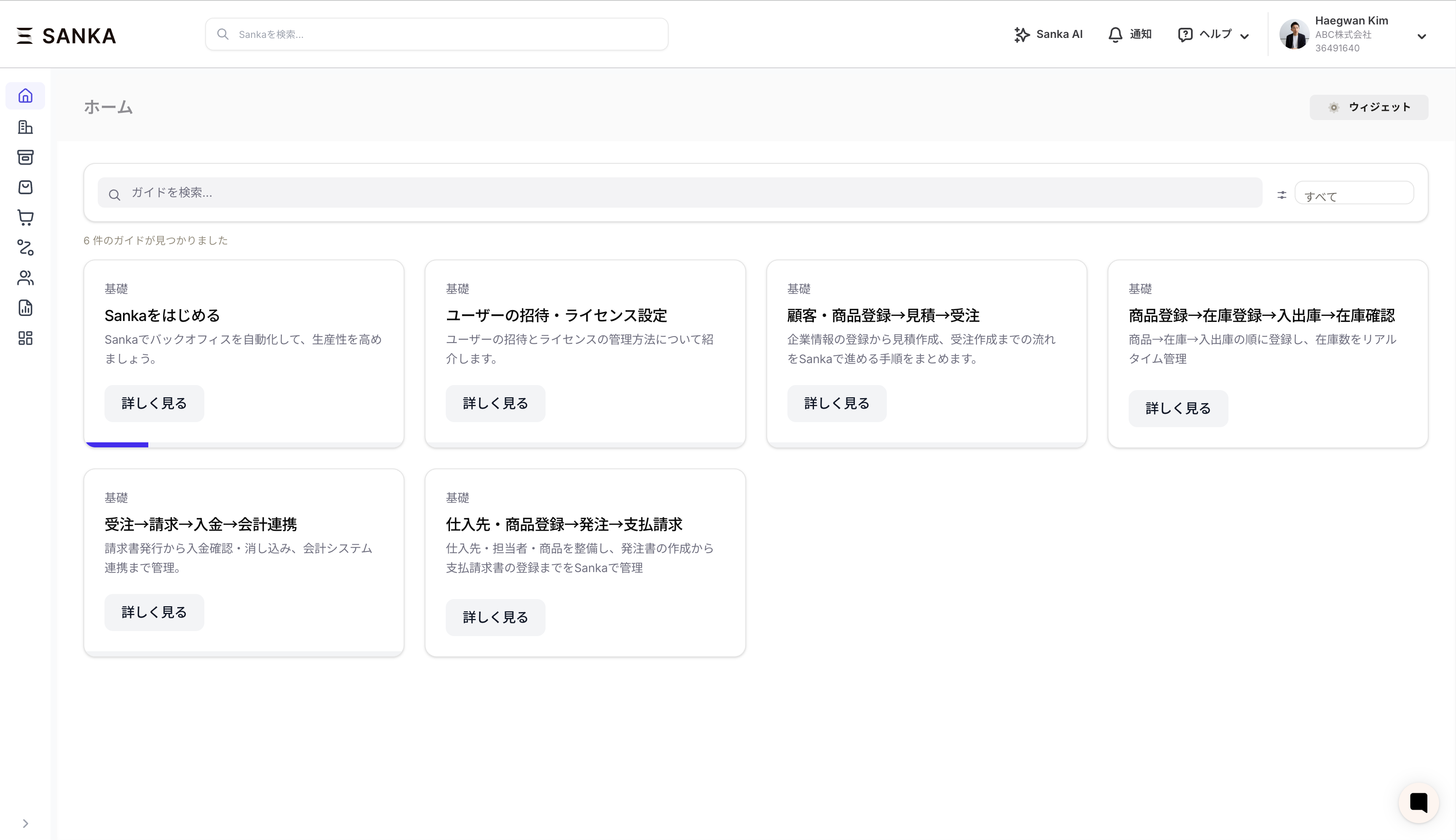 You can now collapse the left-side menu.
This makes it easier to work on smaller screens like laptops and tablets.
- One-click collapse/expand
- On narrow screens, the menu may collapse automatically
Check inventory at any point in time with “Inventory timepoint”
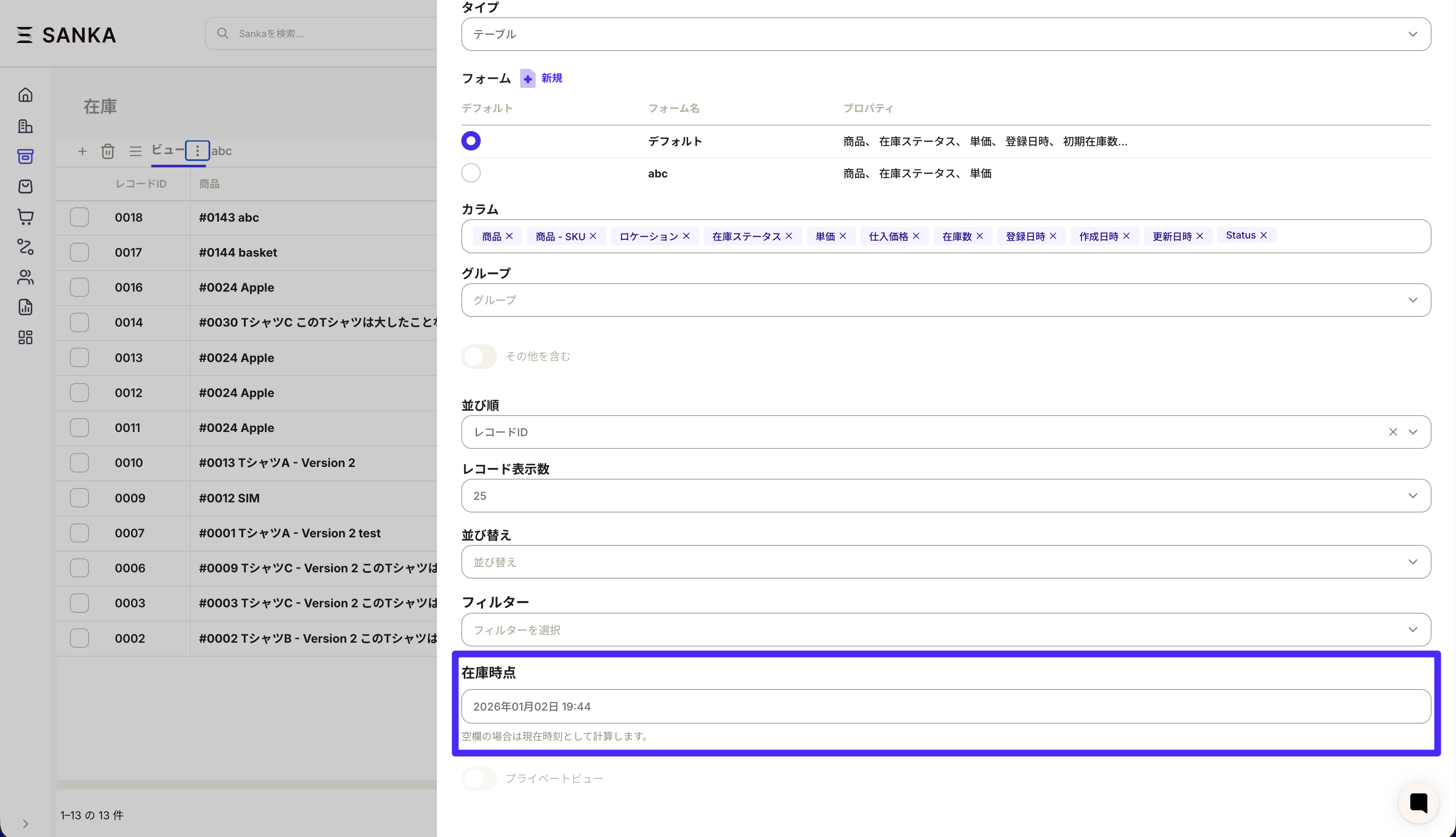 We added an “Inventory timepoint” filter to the inventory list so you can view stock as of a specific date and time.
If left blank, it calculates using the current time.
- Helpful for month-end, stocktaking, or future inventory that includes reservations
- Easier to review inventory changes over time
Track monthly AR/AP balances by customer
We added display types for “Accounts receivable balance” and “Accounts payable balance” in sales invoices and payment requests.You can choose a month and view totals and balances by customer (company/contact).
- Faster month-end closing and collection/payment tracking
- Easier to see what remains unpaid or uncollected
Visualize inventory in cases with item pack size
You can now display “Pack size (quantity per case)” in tables and view inventory in case units.This makes inventory management closer to how it’s counted on site (cases, boxes, etc.).
- Example: see inventory as “cases + remainder”
- Easier estimates for picking, shipping, and replenishment in case units
Support AI bot now connects to official documentation
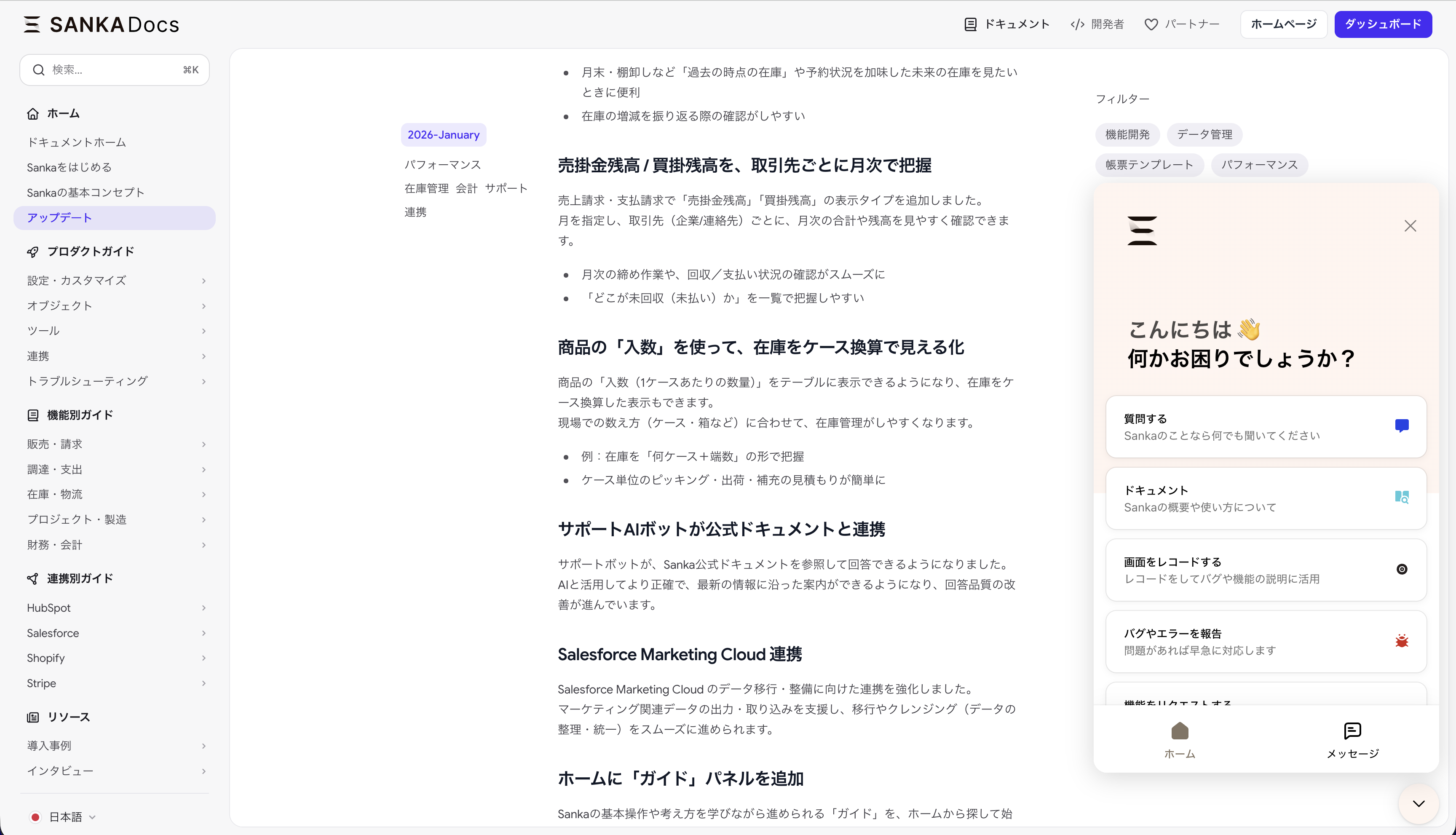 The support bot can now reference Sanka’s official documentation when responding.
This improves answer accuracy and keeps guidance aligned with the latest information.
Salesforce Marketing Cloud integration
We strengthened integration for Salesforce Marketing Cloud to support data migration and cleanup.This helps export and import marketing data more smoothly and makes cleansing (data alignment) easier.
New “Guides” panel on Home
You can now find and start “Guides” from the Home screen to learn core operations and concepts.Progress is saved so it’s easy to resume where you left off.We’ll continue improving Sanka based on user feedback.
2025-December
 We continue to improve Sanka based on user feedback, focusing on speed and practical usability.In December, we shipped a batch of improvements to make daily input and management more comfortable.
Clear horizontal scrollbars in every environment
We heard that horizontal scrolling in wide tables was hard to manage on Windows or with mouse-only setups.We now show horizontal scrollbars across all pages so you can operate consistently on any device.
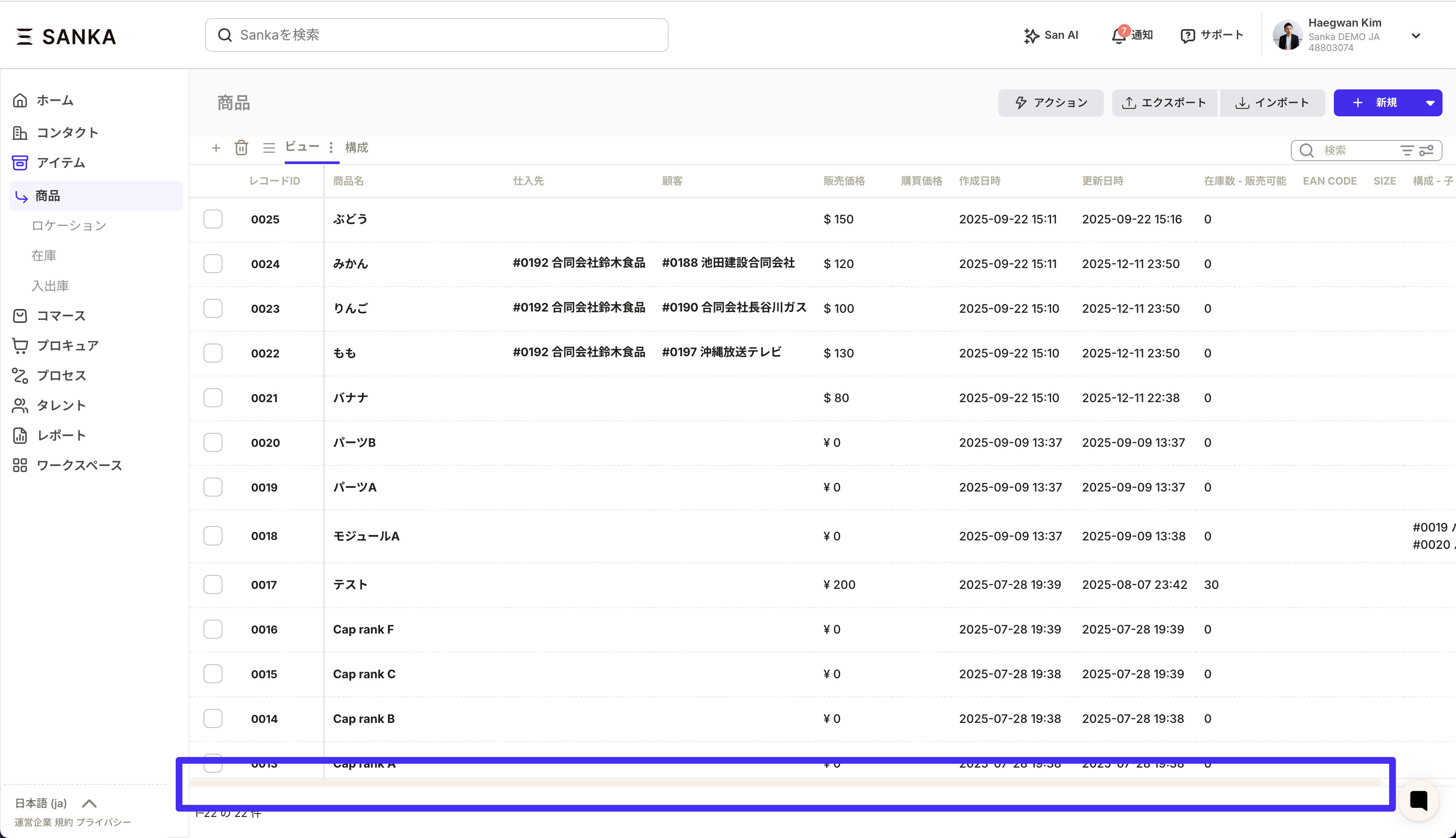
- Quickly see how far you can scroll in wide tables
- Scroll position is visible, reducing confusion
- More consistent behavior across Windows and Mac
Flexible association display on record forms
Related records (associations) appear on record forms, but users often want to show only what they need and reorder it.You can now select which associations to display and arrange them freely.
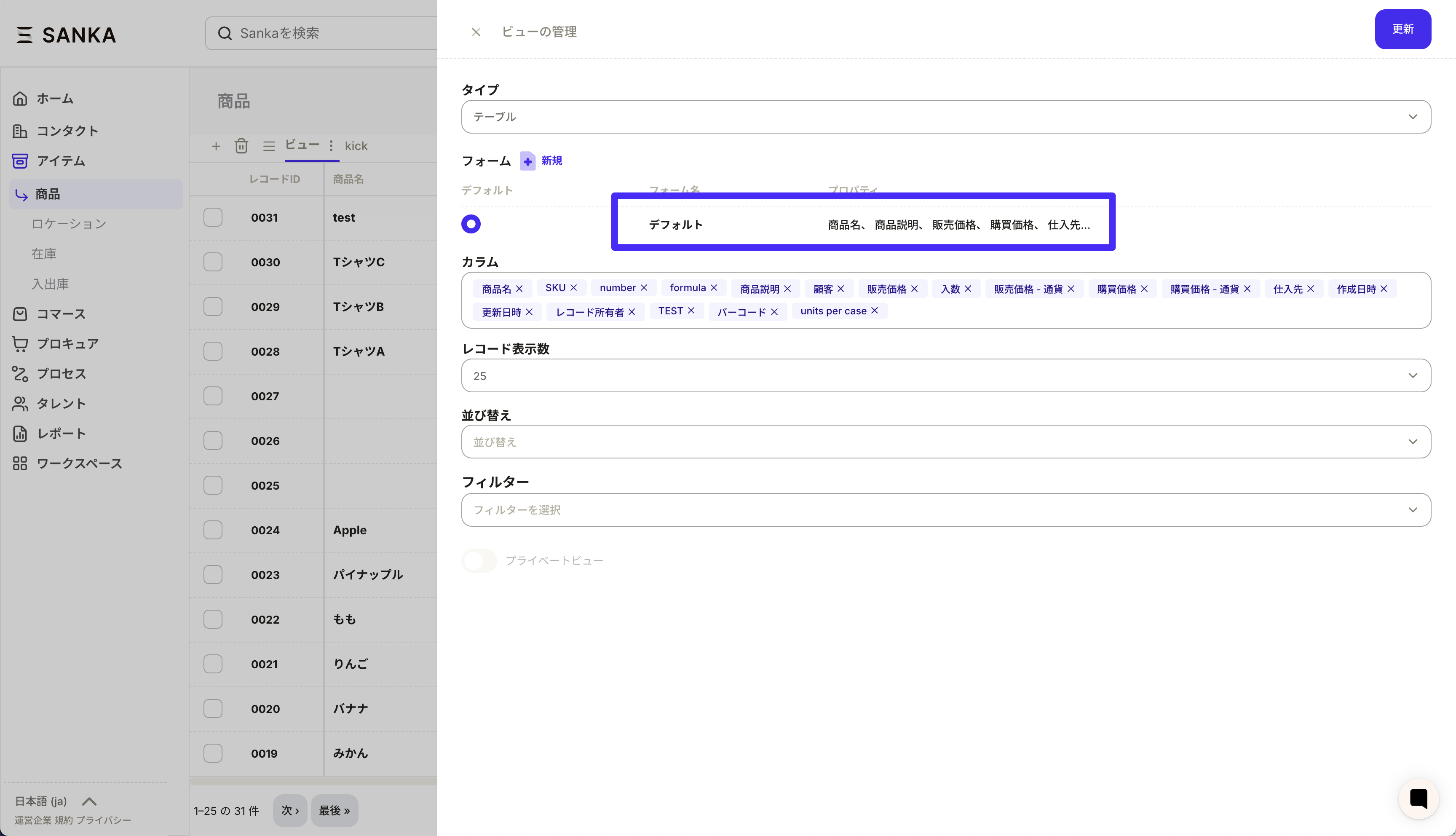
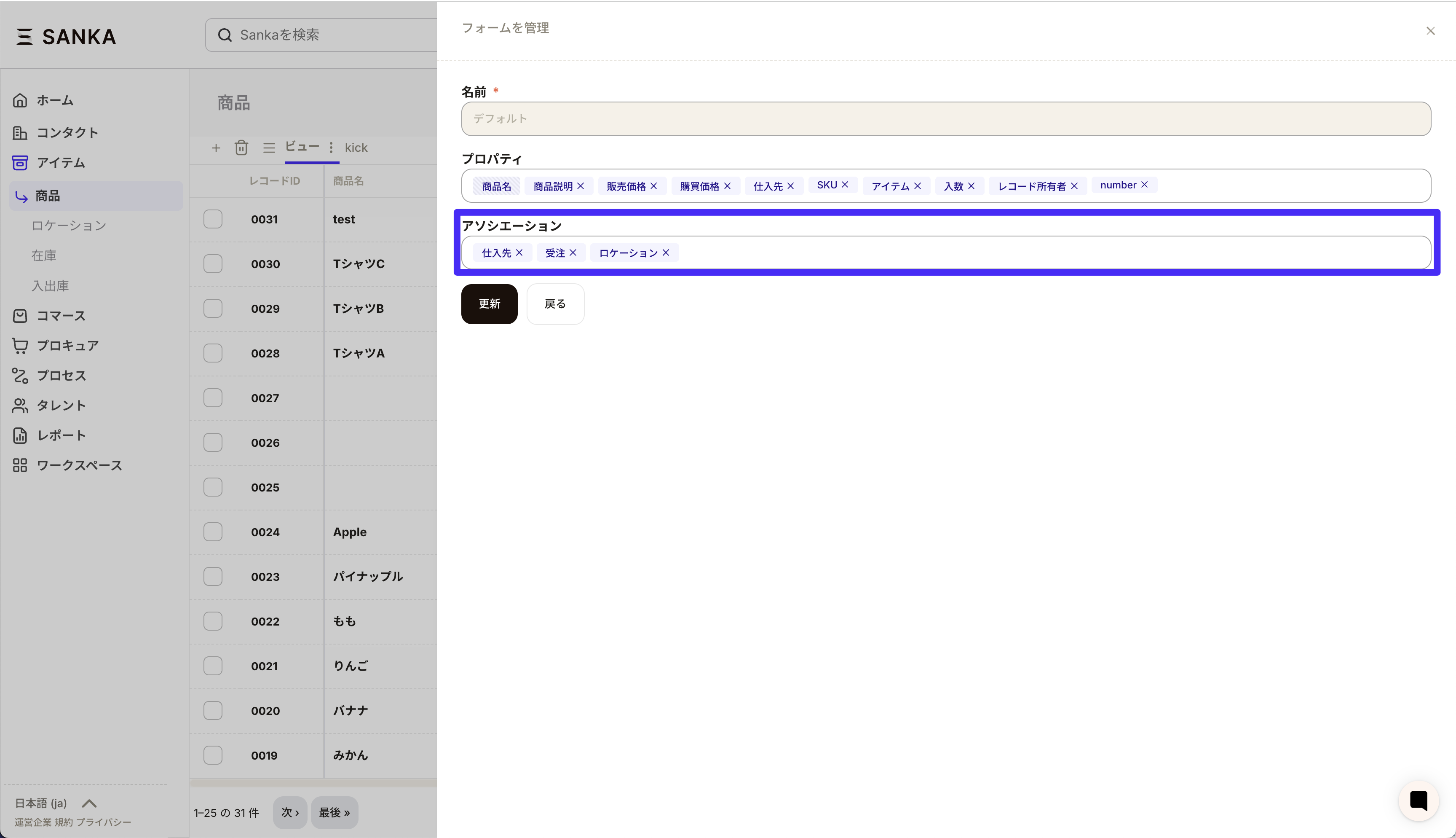
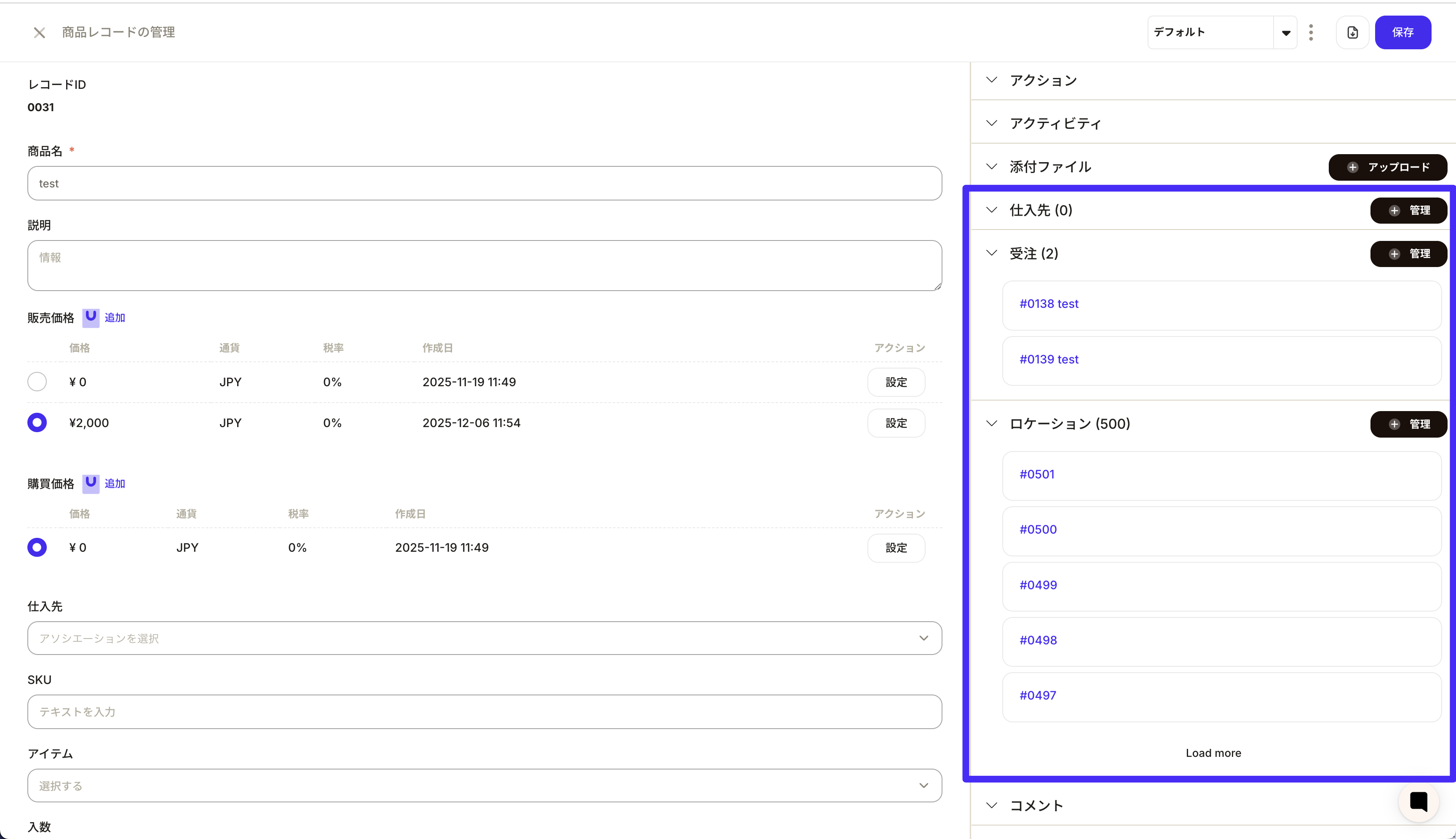
- Choose which associations to show and hide the rest
- Drag and drop to prioritize important relationships
- Cleaner input screens and faster access to key info
Added “Record source” and “Record source detail”
To make data origins clearer, we now track record sources across all objects.You can see whether a record was created in the UI, imported via CSV, or generated by an integration.
- Record source: UI / CSV / Integration, recorded automatically
- Record source detail: CSV import IDs or integration reference IDs
- Use in views and filters for audits and root-cause analysis
New “Leave” object (beta) in the Talent module
We added a new object to manage leave requests within the Talent module.Managers can set allowance rules, and employees can submit requests within their limits.
- Managers set days and periods per leave type
- Employees apply for leave and track remaining days
- Leave history is recorded for team-wide visibility
PDF template editing upgrades
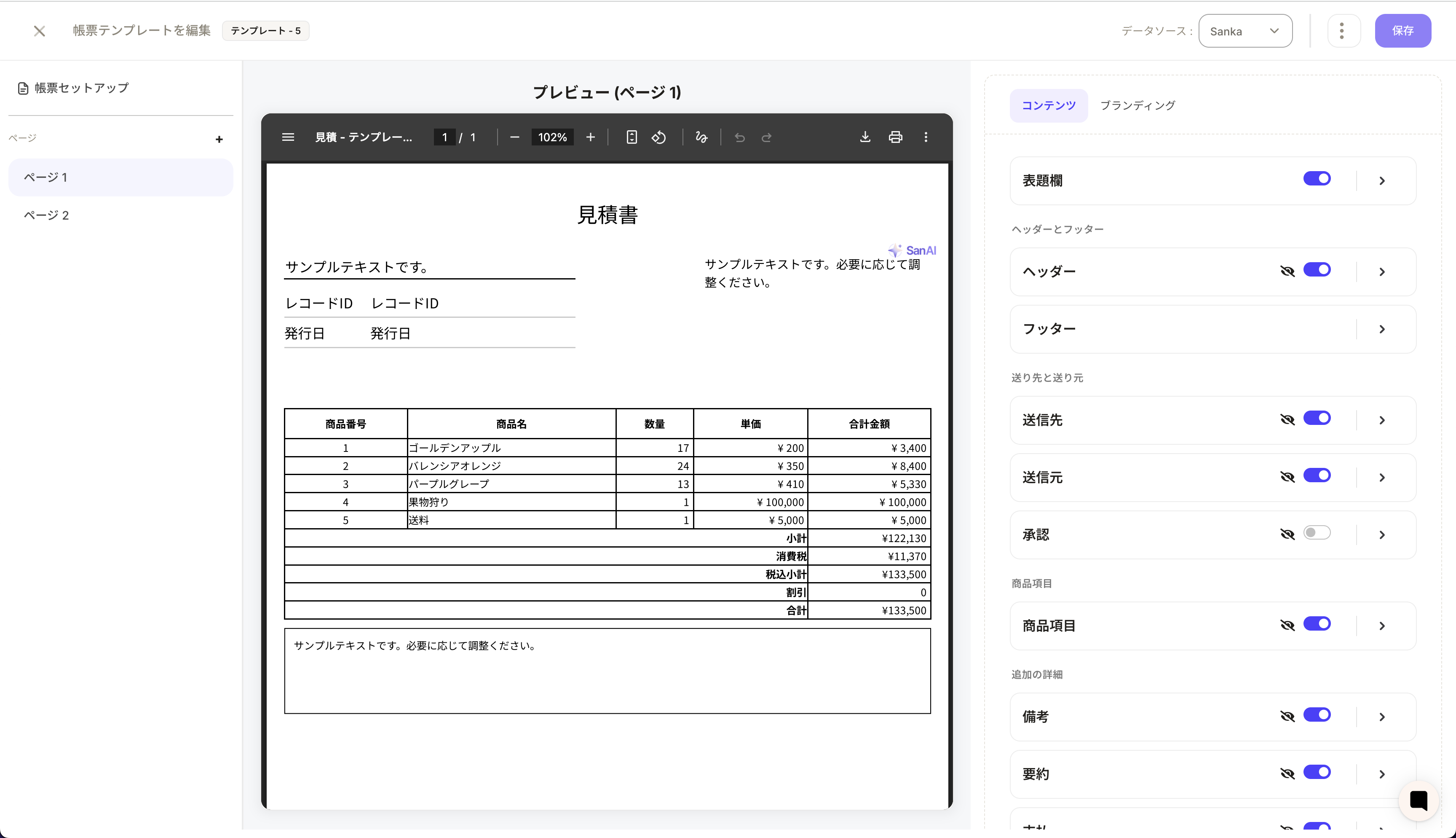 PDF templates (estimates, invoices, etc.) are widely used, and many users asked for finer layout control.
We enhanced the template editor with page-level editing and free image placement.Page-level layout editingEdit layouts on a per-page basis for multi-page documents.
This makes it easier to design readable templates even with long line items.Place custom images anywhereAdd logos, stamps, signatures, or notes at any position on the template.
This enables more flexible designs aligned with your brand and operations.We’ll keep improving usability and flexibility based on real-world needs.
2025-November

Build a branded customer portal
Your customers can now place orders, review invoices, and check product or shipping status directly from your portal.This extends Sanka’s order-to-invoice flow beyond the internal team, reducing email and file-sharing overhead.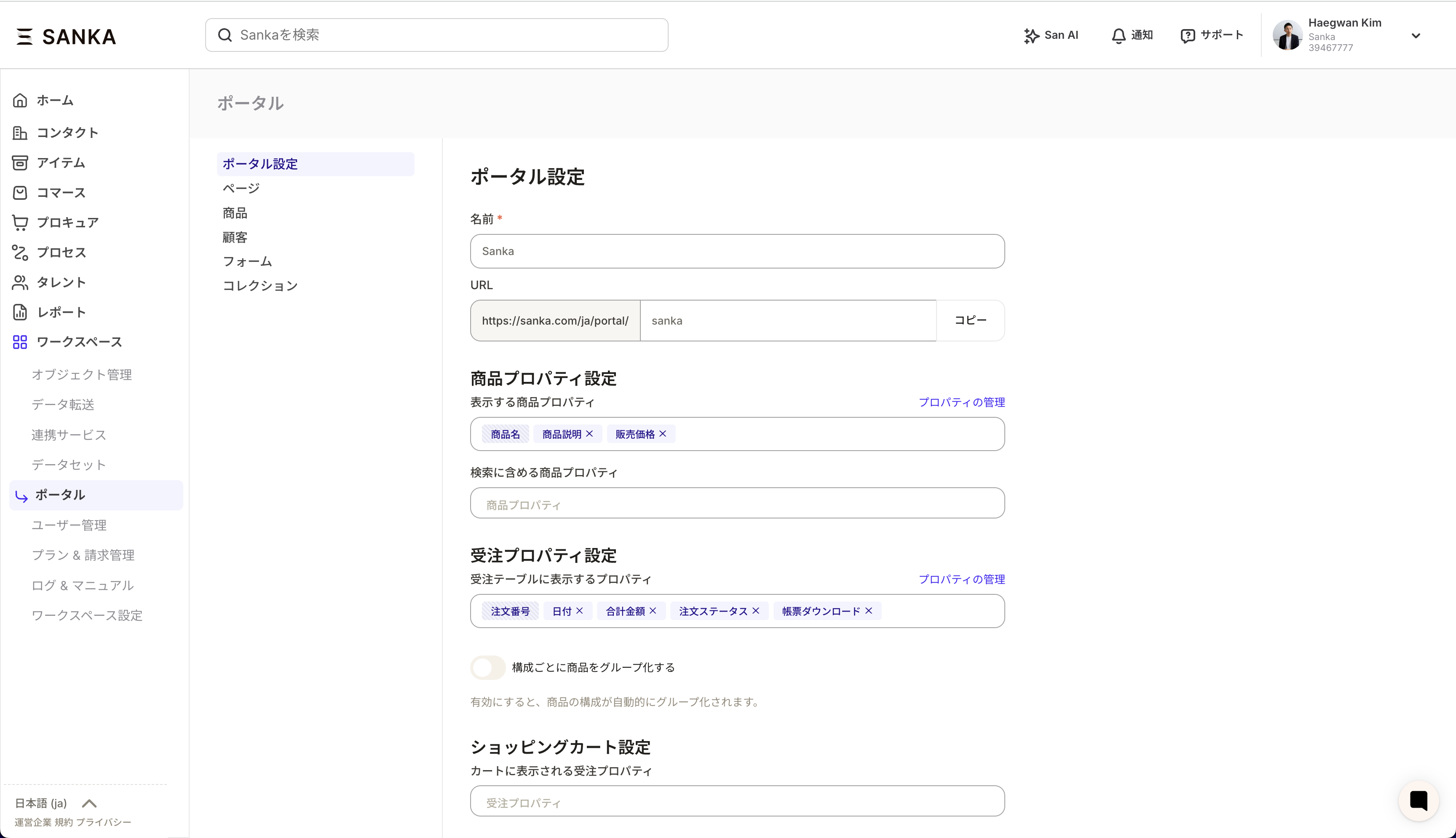
- Customers can self-serve order creation, status checks, and invoice downloads
- Search and compare products or vendor-specific pricing inside the portal
- Control view/edit permissions with property management
- Portal orders sync bidirectionally with Sanka’s order object
Developer API (limited preview)
We opened early access to Sanka’s API for select customers to expand integrations.Authentication, endpoints, and documentation are in place so you can exchange data between Sanka and your systems. See the docs for details.- Issue tokens and set scopes in the developer portal
- Core object CRUD and related endpoints will expand over time
- Implementation guides and samples are available at https://docs.sanka.com/en/developers/api
Docs and blog migration
We consolidated the help center and blog into the new Sanka Docs, improving search and update frequency.- Redesigned navigation across objects, tools, and core concepts
- Documentation now stays fresh through an update-first workflow
- Receive updates via RSS and email notifications
New CSV export experience
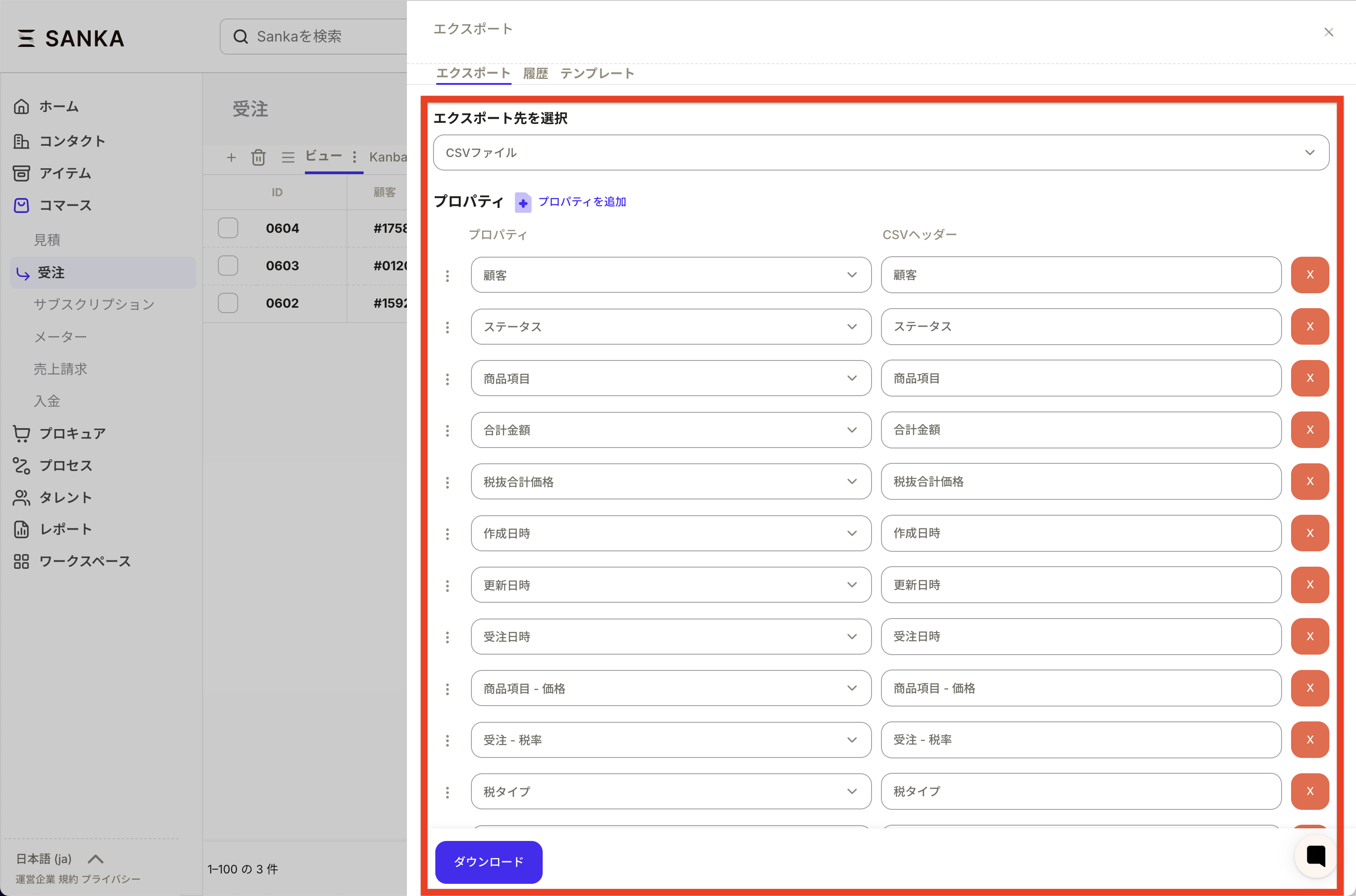 After many requests, CSV export has been redesigned.You can now change header labels, set fixed values, and define output formats when exporting records from Sanka.This removes manual Excel cleanup by matching external requirements for column order, fixed values, encoding, and sort order.
- Configure column order, delimiter, encoding, and line breaks
- Save and reuse formats with templates
- Add fixed values per column for external requirements
- Include association properties as needed
2025-October
Multi-workspace URLs with short IDs
Previously, it was difficult to use multiple Sanka workspaces side-by-side in the same browser.This update assigns each workspace a unique short ID, allowing you to switch clearly at the URL level.
- Each workspace gets an auto-generated short ID (example:
/12345678/orders/) - The auto-assignment logic enables cross-workspace management
- Sanka AI can also be separated by workspace for safer usage
- Work in multiple workspaces across tabs
- Switch between “production,” “test,” or client-specific tenants
2025-September
Redesigned associations: build relationships more freely
In Sanka, you can connect records such as companies, contacts, cases, invoices, and custom objects using associations.This update expands association capabilities so you can design labels and relationships more flexibly.
1. Customize association labels
Key improvements include:- Create labels freely per workspace (e.g., Billing Contact, Implementation Partner, Parent Company/Subsidiary)
- Multi-language support; user-created labels sync automatically to Japanese
- Explicitly control which objects connect to which; same-object associations are also supported
- Store relationship metadata (1-to-1 / many-to-many) for UI logic such as selection limits
2. Context-specific label display
Some teams want different label names depending on the screen. Now you can:- Show “Billing Contact” on orders and “Related Order” on invoices
- Define context labels by custom object ID or slug
- Auto-generate default labels per object via autocomplete logic
- Diverse real-world relationships like “Parent Company,” “Group Company,” or “External Advisor”
- Flexible links between standard and custom objects
2025-August
Full redesign of custom PDF documents
The look and feel of external documents—quotes, invoices, purchase orders, delivery notes, and receipts—directly reflects your brand and process.We rebuilt the PDF document engine to enable much more flexible customization.
1. Template management
- Manage templates per workspace
- Duplicate templates and freely adjust logo or stamp placement
- Generate PDFs that match the on-screen layout using previews
- Auto-apply date formats and currencies based on workspace settings
2. Flexible data insertion
You can insert both standard and custom properties into templates.- Use standard fields like company name, customer name, totals, taxes, and due dates
- Express document-specific logic (line items, subtotals, taxes, discounts, payment terms) in templates, including invoice requirements
- Dynamically display related information (e.g., billing contact, shipping destination) via association labels
3. Generate documents for multiple records and summaries
Generate PDFs for multiple records in one template.- Combine multiple invoices or delivery notes into a single file
- Support grouping and aggregation (by item or department)
2025-July
Enhanced Salesforce import/export
To make Salesforce and Sanka data sync faster and safer, we expanded the import/export foundation.It now supports large-volume data sync not only for standard objects but also for custom objects.
1. High-speed imports for large datasets
Salesforce imports are implemented as object-specific modules.- Support for Account, Contact, Item, Order, and custom objects
- Streaming processing and checkpoints for fast, resumable imports
- Improved logs and progress tracking for easier troubleshooting
- Flexible property and object mapping (e.g., mapping custom objects to Sanka invoices)
- Automatic assignment for owners and related objects (customers/companies)
2. Flexible field and relationship mapping
Across modules, you can define “Salesforce field → Sanka property” mappings in detail.- Dynamically fetch candidate Salesforce fields and map them via drag & drop
- Support custom fields (
__c), user references, record types, and attachment URLs - Import relationships as associations via association mapping
3. Export capabilities
We also expanded export coverage.- Create or update Salesforce CRM records from Sanka
- Process large datasets asynchronously and safely
- Update existing Salesforce records when present; create new records only when missing
2025-June
 Sanka continues to evolve every day as an AI-powered cloud ERP focused on ease of use and maximizing operational efficiency.We have released three new updates: keyboard shortcuts, advanced search, and private views.Below is an overview of how each feature supports your daily work.
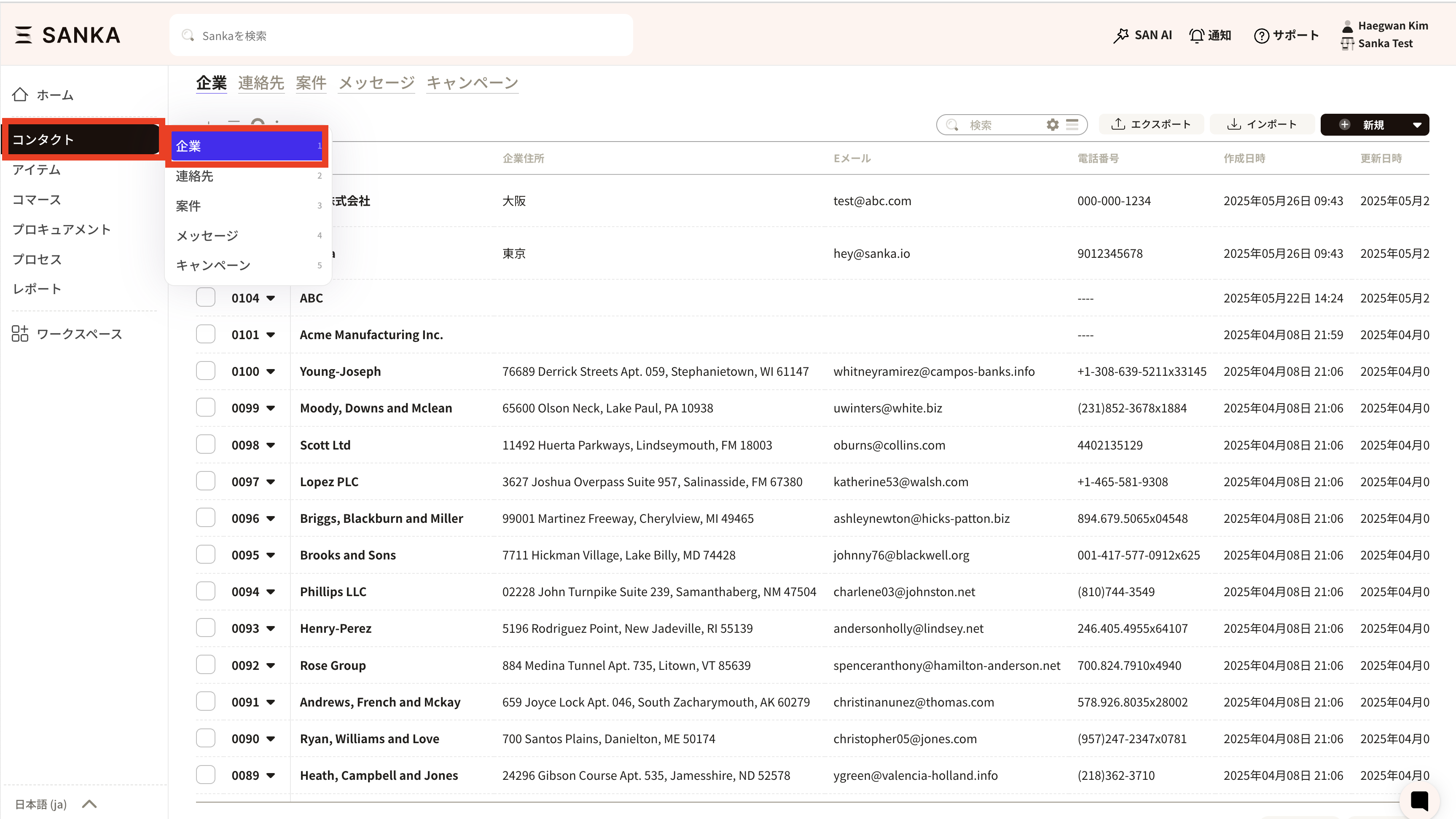
1. Work faster with keyboard shortcuts
Have you ever felt that it takes too many clicks to open the module you use all the time?Keyboard shortcuts in Sanka remove that friction.- Press
hto go straight to the Home screen - Use short codes like
1-1to jump directly to a specific module
2. Find what you need with advanced search and improved scopes
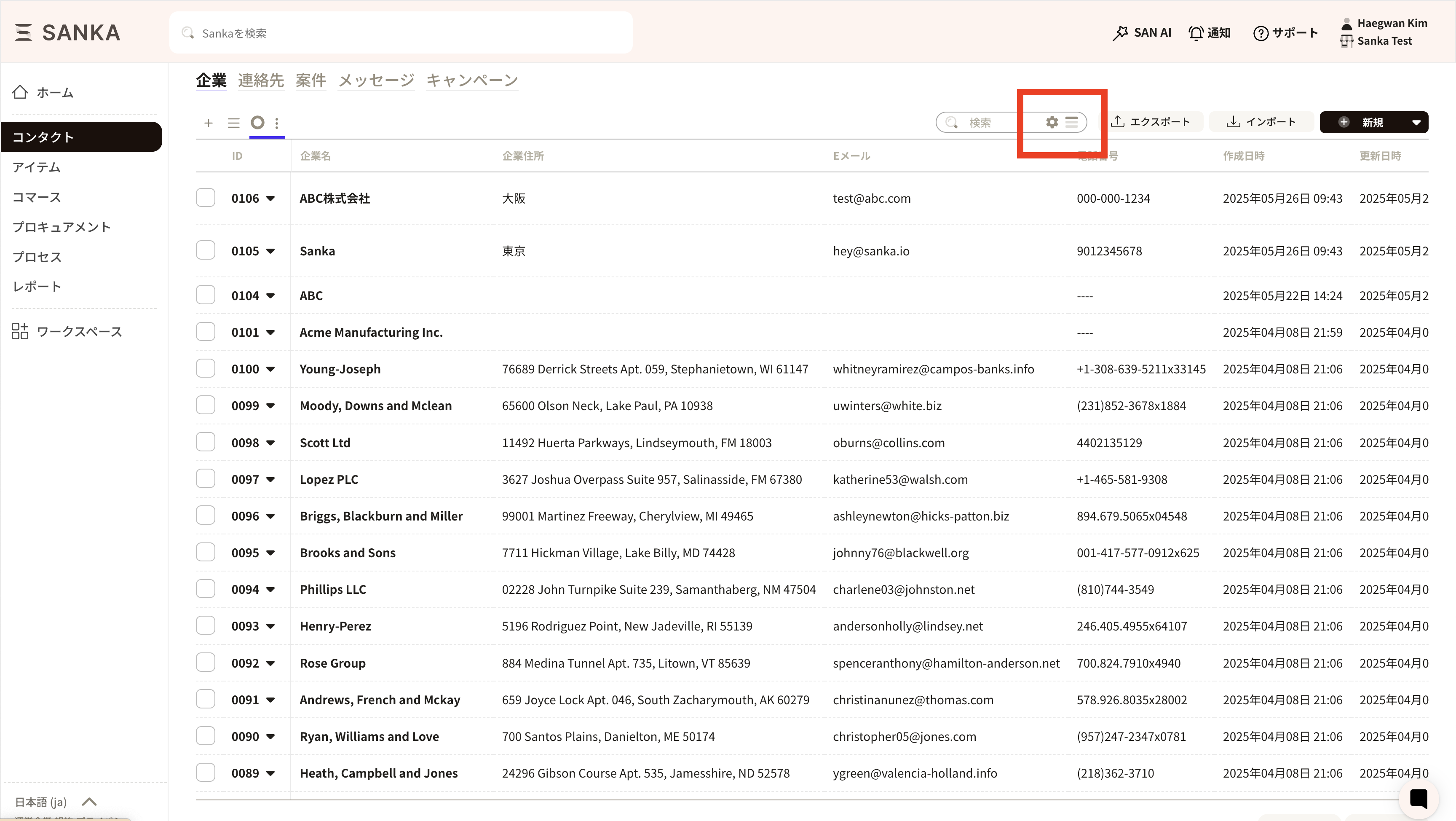
Searching with multiple conditions is now more flexible and easier than before.- Click the filter icon next to the search bar in a view to set advanced conditions
- Save frequently used conditions so you don’t need to rebuild the same filters every time
- Search scopes that previously lived in the object management screen are now integrated into the search bar, making detailed filtering more intuitive
3. Create your own workspace with private views
As shared views grow, you may feel that “this view is really only for me, but everyone can see it” or that view management is becoming cluttered.Private views are designed to address exactly this situation.- Create views that only your own account can see
- Customize views to match your working style without affecting your team
- You can set a view as private only when you create it; existing public views cannot be converted into private views
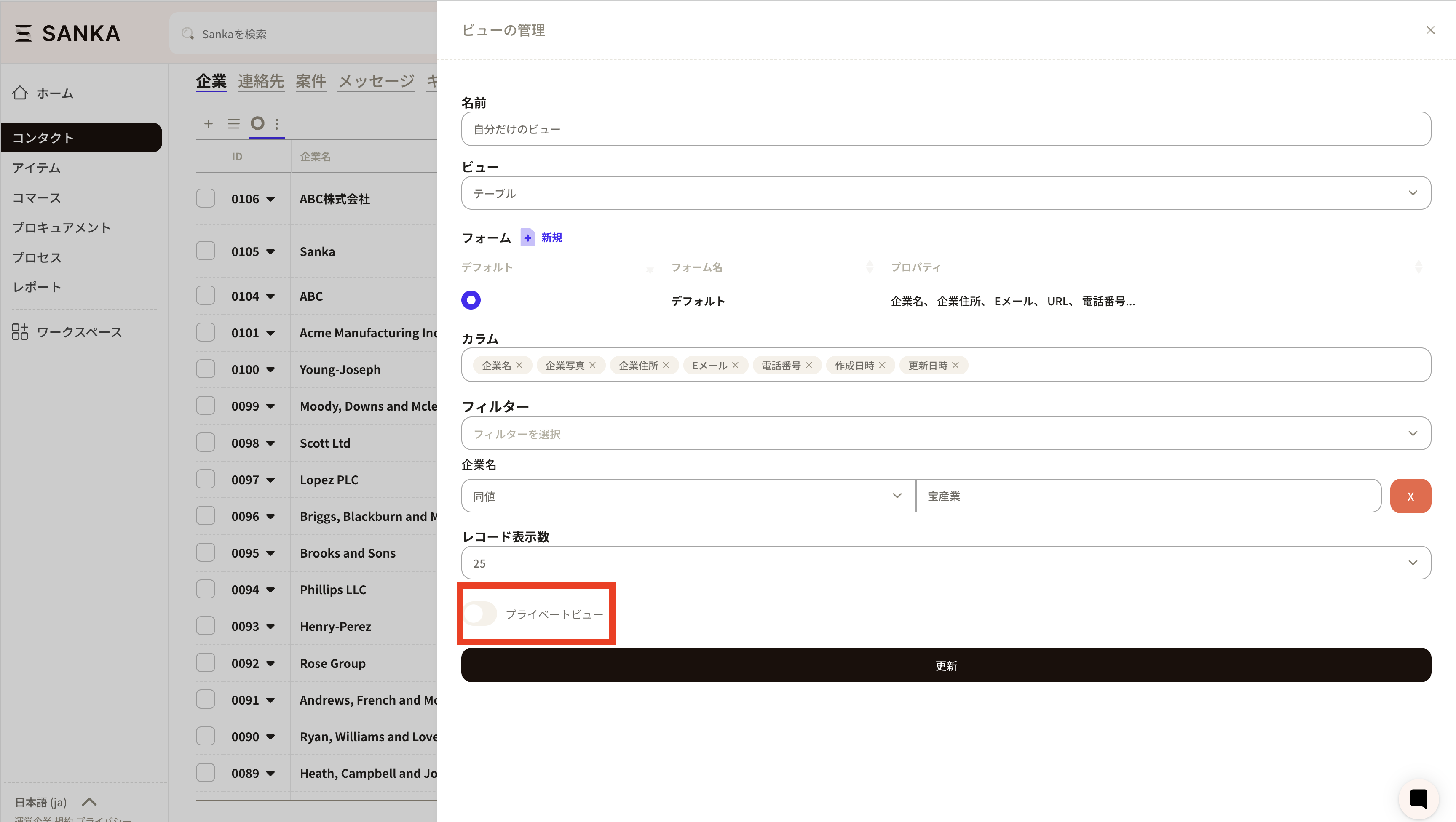
Summary: Toward a smoother, more efficient workspace
These updates are an important step toward Sanka’s vision of “operations management without unnecessary complexity.”- Use shortcuts to reduce operation time
- Use advanced search to access the right information instantly
- Use private views to build a personalized, comfortable workspace
2025-May
Version 1.16 (May 15, 2025)
Major update to subscription management
We have significantly revamped the subscription management feature, one of the most popular capabilities among Sanka users.In subscription-based business models, visibility into revenue and customer behavior is critical. With this update, you can operate your subscriptions more intuitively and strategically.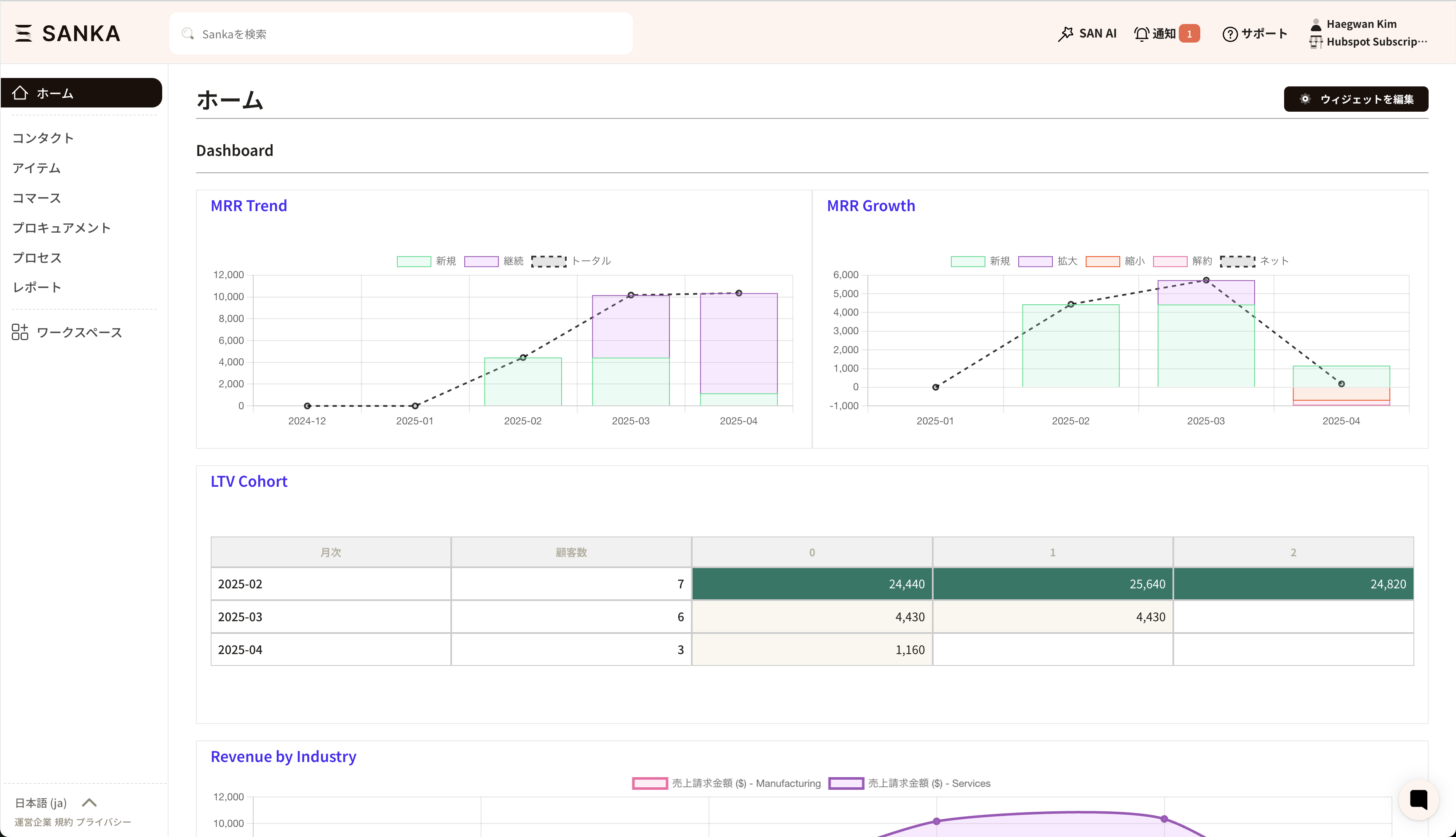 1. Visualize MRR structure and growth with bar chartsYou can now display the structure of Monthly Recurring Revenue (MRR)—including new, existing, and churned revenue—in clear visual reports.This makes it easy to see who is contributing how much revenue under which plans, and you can use these insights to track KPIs and support management decisions.2. Use cohort analysis to break through retention barriersWe’ve added cohort analysis as a new feature. Customers are automatically grouped by their first billing month, and you can track retention and churn trends over time for each group.3. Analyze billing data by customer and productYou can now automatically aggregate and analyze billing data by industry and product category.This helps you answer questions like “Which industries are most profitable?” and “Which product categories contribute most to retention?”, directly informing your product and sales strategies.
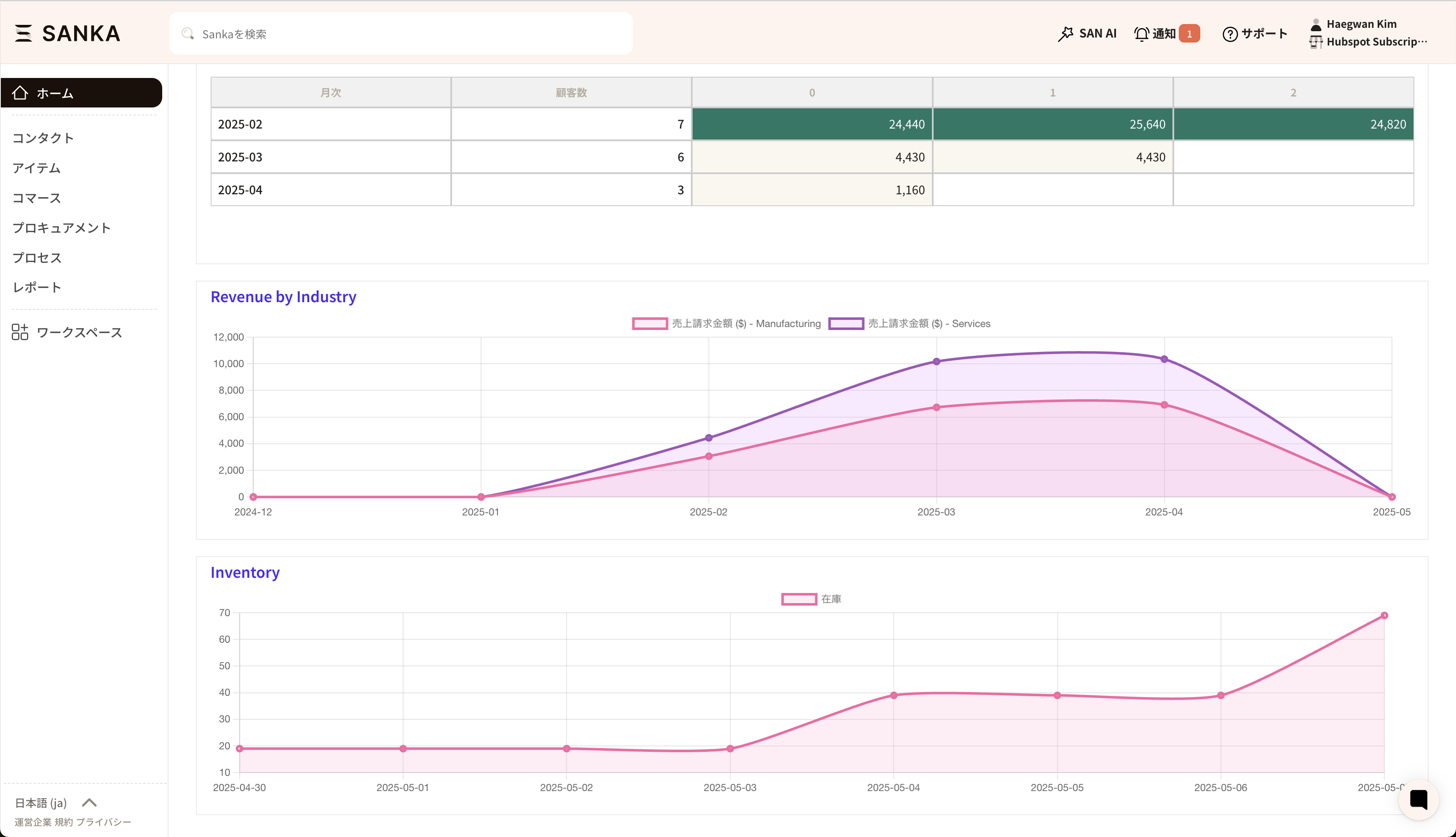 You can create these reports from the
 Report object, using revenue and billing objects as metrics in bar and line charts.4. Smarter integration with Stripe and other payment servicesWith this update, you can automatically fetch and update payment statuses from external payment systems not only via Sanka workflows, but also directly from the subscription screen. This makes daily operations more intuitive.Other updates
We have also made various minor bug fixes and enhancements.2025-April
Overview of the HubSpot CRM integration
We have delivered a major refresh of our integration with HubSpot, a partner for which we are seeing rapidly increasing demand.With this update, you can use Sanka’s full capabilities directly inside HubSpot.By linking HubSpot users with Sanka users, records created in HubSpot are now also recorded in Sanka’s user logs.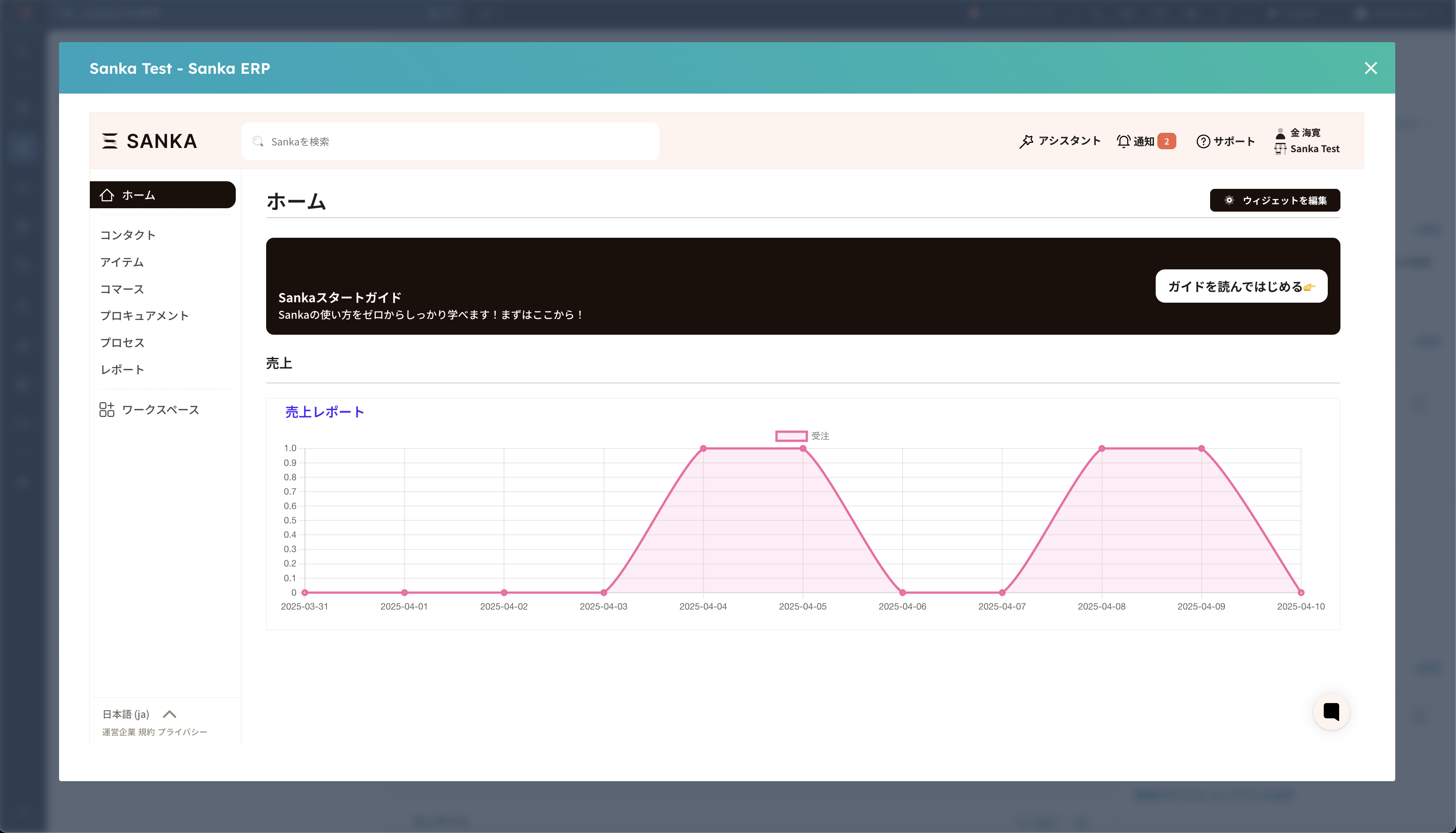 By connecting HubSpot CRM with Sanka ERP, we provide a unique end-to-end solution that seamlessly links your front office and back office.
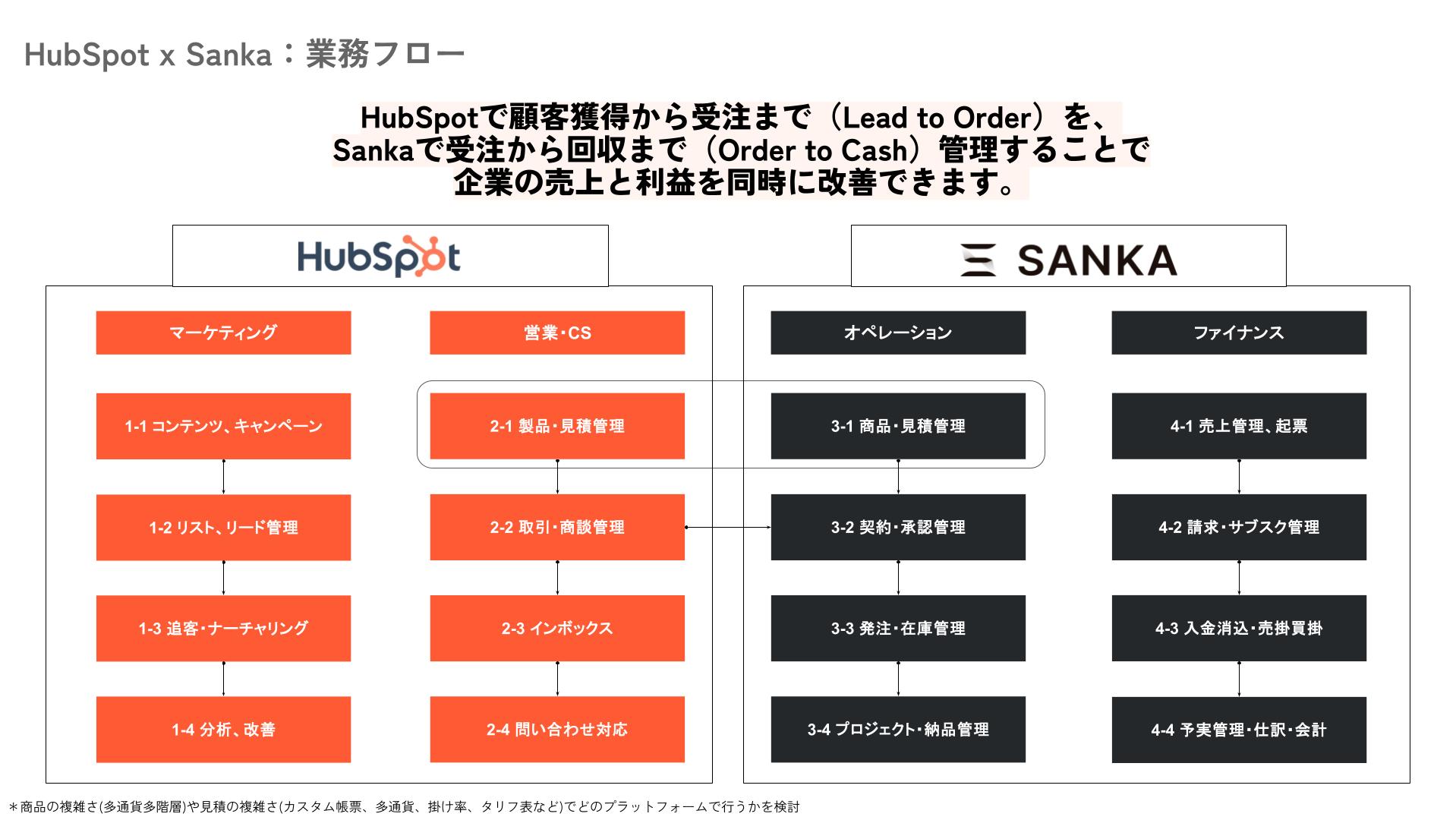 By integrating HubSpot and Sanka, you can handle areas where HubSpot alone has traditionally been weaker—such as commerce (documents, subscription management, inventory)—as well as company-wide productivity initiatives (budget vs. actual management, approval flows, task management), all from within HubSpot.We encourage you to take this opportunity to try the HubSpot integration.https://help.sanka.com/ja/articles/75-hubspot%E9%80%A3%E6%90%BA
Other updates
We have also made various minor bug fixes and enhancements.2025-March
Redesigned Archive feature
We have redesigned the Archive feature and implemented a highly requested capability: separating archived records from active records.From the new dedicated archive page, you can list and manage archived records. This prevents archived data from being mixed with active data and removes the confusion about which records should be reactivated later.In line with this change, we removed the “Usage status” column from views to keep data management simpler. You can access the archive list from the View Management button (see the screenshot below).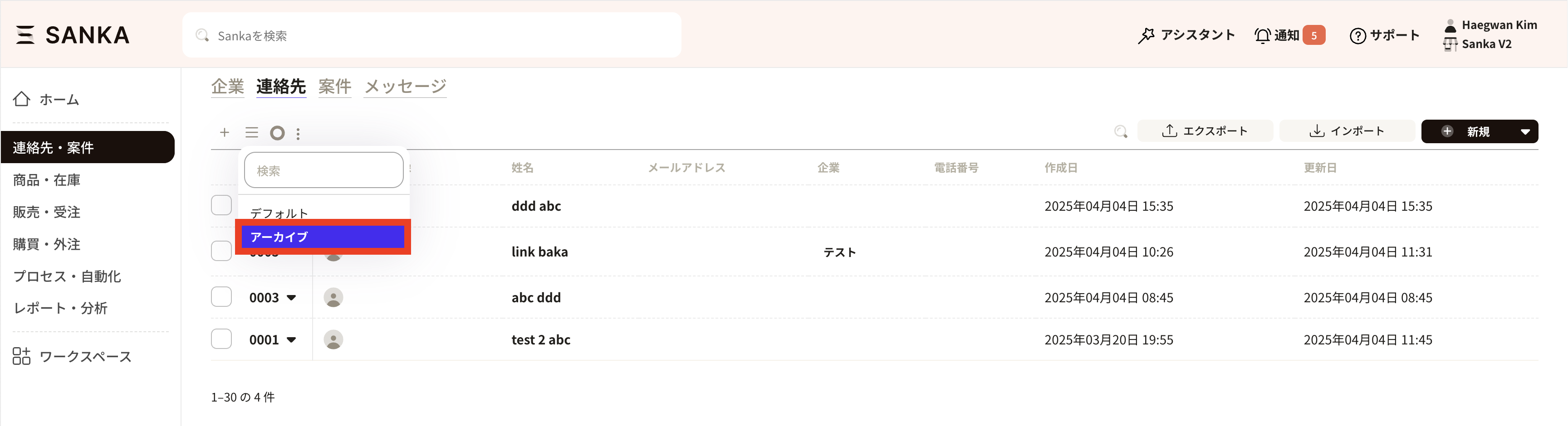
Unified Employee object and user management
We have also delivered another popular request: integrating employee management with user management.With this change, you can add employee information (such as working conditions and contracts) directly to users, making administration simpler.Workflow optimization
We grouped all workflow actions into smaller categories—such as approval actions, creating/editing/converting/merging object records, and importing/exporting data to integration services. This makes workflows easier to understand and configure.Server optimization
We split some high-load tasks onto separate, smaller servers. This prevents your operations from being affected by other customers’ workloads.Real-time support
We implemented a new chatbot and help center. This allows you to get immediate answers and receive more contextual, tailored support. We expect these improvements to lead to a better customer experience.New Sanka logo
Lastly, we have a new logo. We hope you like it.